


Phanteks


5V ARGB LED Strip for PC Cases – Phanteks NEON PH-NELEDKT (M1, CMBO, M5)
5V ARGB LED strips for PC cases
The Phanteks NEON PH-NELEDKT series brings diffused, addressable RGB lighting to the edges of PC cases, motherboards, and other hardware. Use the included adapter to connect to a compatible 5V 3-pin ARGB motherboard header. The flexible strips and mounting clips let you follow corners, curves, and straight edges inside the case.
Compatibility
Check the lighting connector before ordering.
- ✓5V 3-pin ARGB motherboard header (+5V, data, gap, ground) using the included motherboard adapter
- ✓5V D-RGB case lighting or controllers with a matching Phanteks 3-pin connector
Not compatible:
- ✗12V 4-pin RGB headers
Design Highlights

Outline the hardware you want to highlight
The strip diffuses the light along its length. Route it around the edge of your motherboard or along the case frame for a continuous line of color.

Route the strip around corners
Use flat or 180° mounts along a straight run and 90° mounts where the strip turns a corner. Adhesive pads hold the mounts in place.
Key Specifications
| Lighting | 5V addressable RGB (D-RGB) |
|---|---|
| Strip color | Black |
| Strip width × thickness | 13 × 5.5 mm |
| Strip input | Phanteks 3-pin female |
| Strip output | Phanteks 3-pin male |
| LEDs per strip | M1 70 · CMBO 28 · M5 38 |
| Maximum current per strip | M1 2.1 A · CMBO 0.84 A · M5 1.14 A |
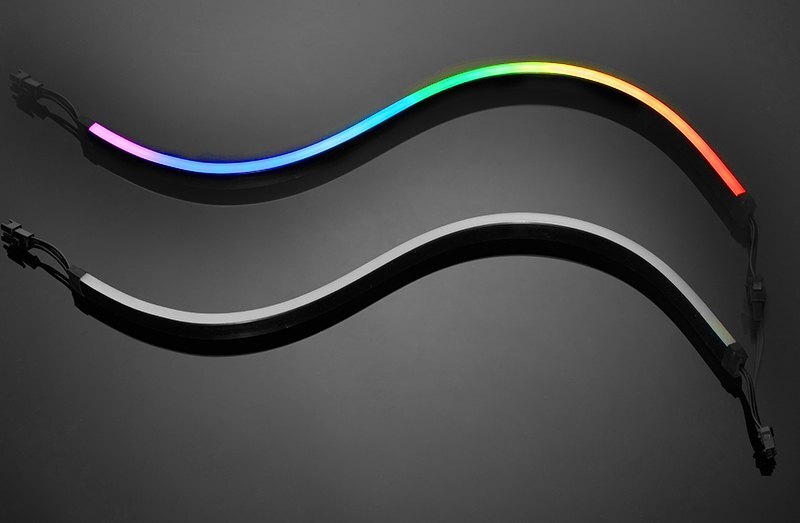
The CMBO option includes two 400 mm strips.
Which Version Do I Need?
Use the Option selector to pick the strip layout that suits your build.
What's in the Box
M1 includes one 1,000 mm NEON strip and four mounts of each type.
CMBO includes two 400 mm NEON strips, one extension cable, and four mounts of each type.
m5 includes one NEON strip.
Installation & Use
You need a compatible 5V 3-pin ARGB motherboard header or a compatible 5V D-RGB controller for power and lighting control.
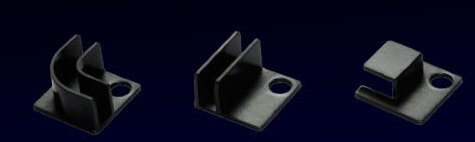
From left to right, the 90° mount, 180° mount, and flat mount.
FAQ
Do I need a separate ARGB controller?
Use the included adapter if your motherboard has a compatible 5V 3-pin ARGB header. If you have neither that header nor a compatible case lighting controller, use a compatible 5V D-RGB controller with a matching connector. The kits do not include a controller.
Which header should I check on an MSI motherboard?
Check your motherboard manual for the 5V 3-pin ARGB header, its pinout, and its load limit. Depending on the model, MSI may label it JRAINBOW or JARGB_V2. Do not connect the strip to a 12V 4-pin JRGB header.
Can I daisy-chain the two CMBO strips?
Yes. Connect one strip’s Phanteks 3-pin output to the other’s input. Use the included extension cable if the strips are farther apart.
Can I mount the strip around a corner?
Use the supplied 90° mount at a corner. The kits also include 180° and flat mounts for straight sections.
- Before adding devices to the chain, check the total current and LED count against the limits in your motherboard or controller manual.








