

Bykski




ATX/E-ATX GPU Anti-Sag Bracket – Lian Li GB-001, Black
GPU anti-sag support that mounts to the motherboard
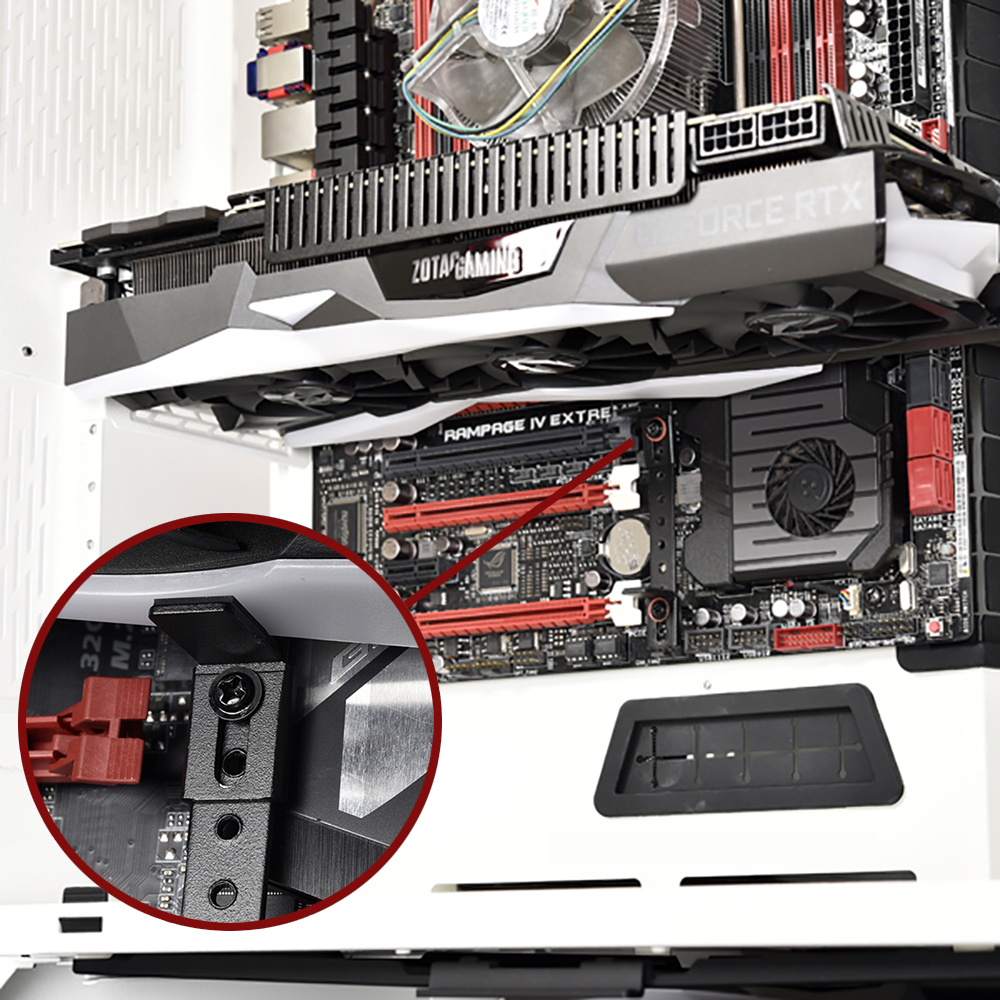
The Lian Li GB-001 is a motherboard-mounted bracket that helps prevent a horizontal graphics card from sagging. The rail attaches at motherboard screw points, and an adjustable arm supports the underside of the card. Two support arms let you brace one or two cards, depending on your slot layout.
Compatibility
Lian Li lists these motherboard form factors.
- ✓ATX
- ✓E-ATX
Before ordering, check the mounting holes next to your PCIe slots and look for clearance around the GPU fans and the motherboard chipset heatsink.
Key Specifications
| Model | Lian Li GB-001 |
|---|---|
| Color | Black |
| Mounting points | Motherboard screw holes |
| Card orientation | Horizontal |
| Support arms | 2, height-adjustable |
Bracket and Mounting Details


What's in the Box
Installation & Use
FAQ
Can I use it with two graphics cards?
Yes. Position one arm under each horizontal card where the rail offers a usable mounting hole and there is clearance around the fans.
Where does the bracket attach?
The rail fastens to motherboard screw points next to the PCIe slots. The arms attach to the rail and adjust to the height of the cards.
- Please allow slight dimension difference due to different manual measurement.