


Bykski

CPU Water Block Installation Tutorial | Bykski
stars, based on ( 0 ) review
FormulaMod Official Store
Bykski
How to Install a CPU Water Block
This Bykski video shows how to mount a CPU water block for a custom liquid cooling loop. Watch it to see how the block and mounting hardware go together. Before you install your block, check its instructions for your motherboard socket, whether it uses a backplate, and how to connect power if it has a display.
Watch the Installation Tutorial
This page is for viewing the tutorial.
Before You Install
| Motherboard socket | Check the socket against the instructions for your exact block. |
|---|---|
| Mounting hardware | Check which screws and backplate your block uses. |
| Display power | If your block has a screen, check how the manual says to connect it. |
Mount the CPU Water Block
1
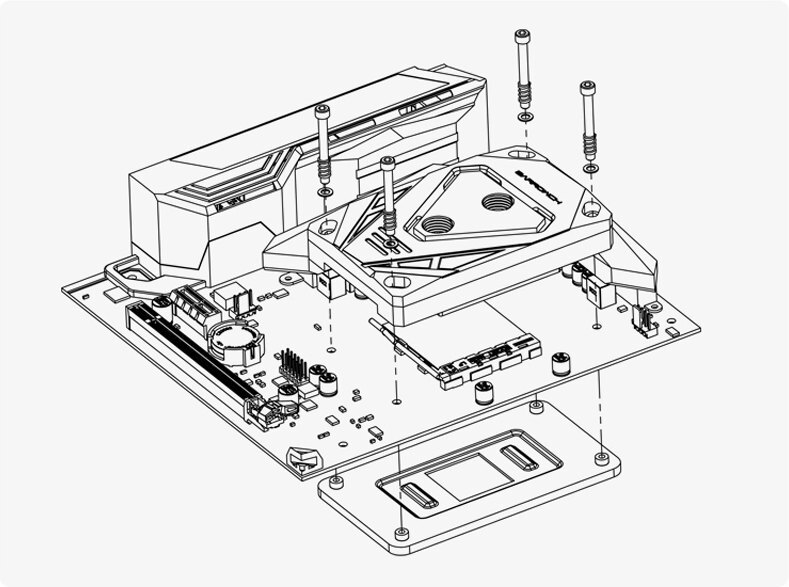
Set out the mounting hardware specified for your block and socket. Check the mounting diagram before changing the backplate.
2
Clean the CPU’s contact surface and apply thermal paste as directed by the block instructions.
3
Align the block with the mounting holes and secure it as shown in the instructions for your hardware.
4
If the block has a display, connect its power as directed by the block instructions.
Example mounting assembly. Check the hardware specified for your block.
FAQ
Can I use the video with a newer CPU water block?
Use it as an installation overview. Check the instructions for your exact model and revision before mounting the block.
Do I need to remove the motherboard backplate?
Check the mounting instructions for your model and socket. Some blocks install without a separate backplate.
What should I check if my CPU water block has a display?
Look up the display power connection in the instructions for that block.
Notes
- Do not purchase this link, only for viewing the tutorial video






