

Bykski


Gigabyte RTX 4080 Water Block with Backplate | Bykski N-GV4080EOC-X-V2
Full-cover water block for select Gigabyte RTX 4080 cards
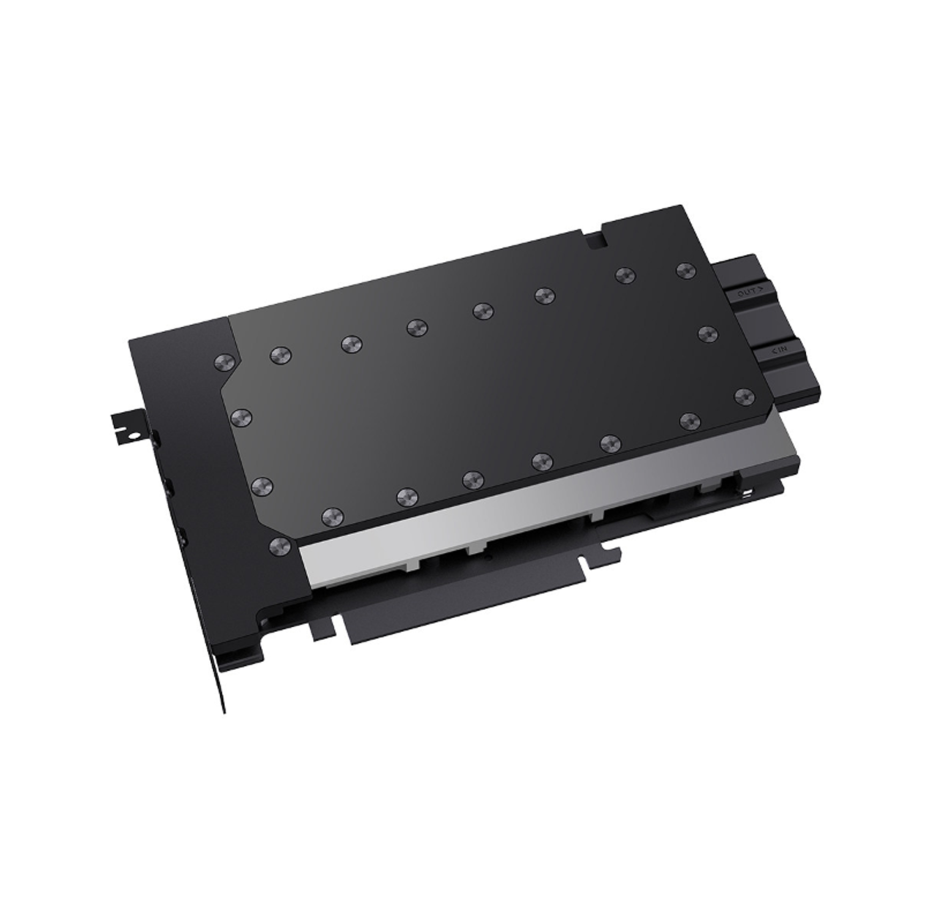
The Bykski N-GV4080EOC-X-V2 replaces the stock cooler on supported Gigabyte GeForce RTX 4080 16GB cards, including the GAMING OC with the matching PCB layout. Its copper cold plate cools the GPU core, memory, and power delivery components. The block connects to a custom liquid cooling loop through G1/4 ports and comes with an aluminum backplate.
Compatibility
Bykski lists these GeForce RTX 4080 16GB models for the PCB layout shown in its compatibility guide.
- ✓Gigabyte GeForce RTX 4080 16GB EAGLE (GV-N4080EAGLE-16GD)
- ✓Gigabyte GeForce RTX 4080 16GB GAMING OC (GV-N4080GAMING OC-16GD)
- ✓Gigabyte GeForce RTX 4080 16GB AERO OC (GV-N4080AERO OC-16GD)
- ✓Gigabyte AORUS GeForce RTX 4080 16GB MASTER (GV-N4080AORUS M-16GD)
Before ordering, check your card’s full model number and compare its entire PCB layout with the photo in Bykski’s compatibility guide for N-GV4080EOC-X-V2.
Key Specifications
| Model | N-GV4080EOC-X-V2 |
|---|---|
| Cooling coverage | GPU core, memory, and voltage regulators |
| Cold plate | High-purity copper |
| Front panel | Stainless steel |
| Port terminal | Black POM with G1/4 inlet and outlet threads |
| Microchannel spacing | 0.3 mm |
| Backplate | Black aluminum, outside the coolant path |
| Backplate (L × W × T) | 232.7 × 136.9 × 6.0 mm |
| Lighting | None |


What's in the Box
Thermal paste is not included (it cannot be shipped by air). Please use your own thermal paste during installation.
Installation & Use
You also need a pump, radiator, tubing, coolant, and G1/4 fittings.
FAQ
How do I check whether my Gigabyte RTX 4080 fits?
Match the full model number in the compatibility list above, then compare your card’s PCB layout with Bykski’s compatibility photo for this block.
What fittings does this RTX 4080 water block take?
Use G1/4 fittings at the inlet and outlet.
Does the included backplate carry coolant?
The black aluminum backplate mounts behind the PCB and stays outside the coolant path.
- This is a repair or replacement-only item. Returns are not accepted in principle on compatibility issues or if the block has had water/fluid run through it.
- The manufacturer reserves the right to alter the block design to expand compatibility or upgrade/modify the product. The delivered item may not 100% match the pictured item.
- Not responsible for any damage caused by or when using this product. Please use it at your own risk.