


Bykski


XFX RX 6800 / RX 6800 XT V2 Overseas Edition Water Block — Bykski A-XF6800-X
Full-cover water block for select XFX Radeon RX 6800 cards
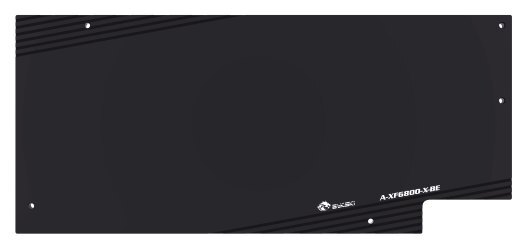
The Bykski A-XF6800-X replaces the stock cooler on compatible XFX cards, including the Radeon RX 6800 Overseas Edition with the PCB layout shown below. Its nickel-plated copper cold plate transfers heat from the GPU core, memory, and power delivery components to a custom liquid cooling loop. A black aluminum backplate mounts behind the card.
Compatibility
Bykski lists these XFX versions for the PCB layout shown.
- ✓XFX Radeon RX 6800 Overseas Edition
- ✓XFX Radeon RX 6800 XT Overseas Edition V2
Not compatible:
- ✗XFX Radeon RX 6800 XT Speedster MERC 319 V1 PCB for A-XF6900XT-X
Before ordering, confirm your card’s exact edition and compare the entire PCB, including the mounting holes and component layout, with the drawing.
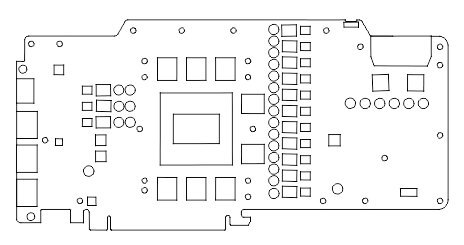
Bykski’s PCB layout drawing for the A-XF6800-X.
Design Highlights
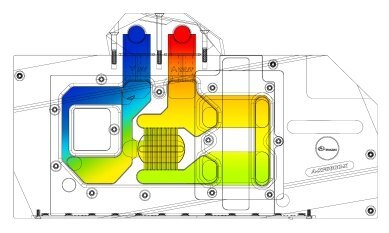
Bykski’s illustration of coolant flow through the block.
Full-cover cooling
A nickel-plated T2 copper cold plate transfers heat from the GPU core, memory, and power delivery components to the coolant. The clear acrylic top lets you see the channels.
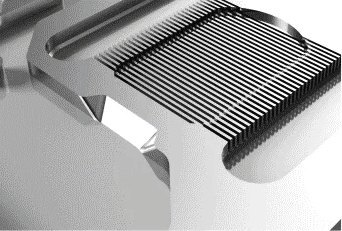
Bykski’s microchannel detail.
Jet microchannels
Coolant passes through fine channels in the cold plate above the GPU core.
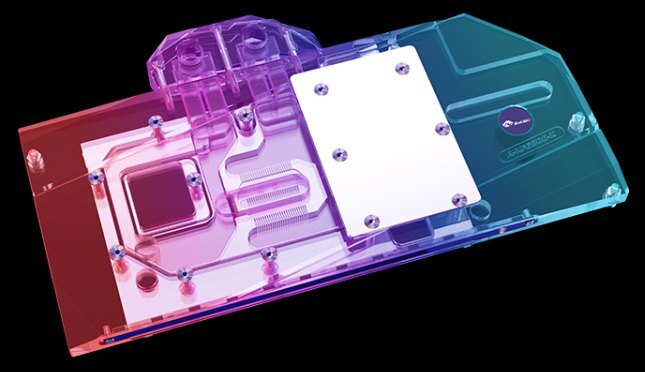
5V addressable lighting
Connect the RBW strip to a 5V 3-pin ARGB header or a compatible 5V ARGB controller. Keep it off 12V 4-pin RGB headers.
Key Specifications
| Model | Bykski A-XF6800-X |
|---|---|
| Retail SKU | A-XF6800-X_RBW |
| Cooling coverage | GPU core, memory, and VRM |
| Cold plate | Nickel-plated T2 copper |
| Top | Clear acrylic |
| Backplate | Black aluminum |
| Backplate (L × H × T) | 266.49 × 117.48 × 6.00 mm |
| Inlet and outlet thread | G1/4 |
| Lighting connector | 5V 3-pin ARGB (RBW) |
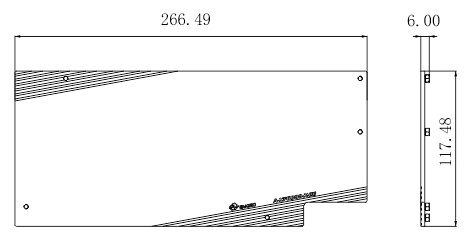
Bykski backplate drawing. Dimensions are in millimeters.
Which Version Do I Need?
Two XFX Radeon RX 6800 XT board layouts use different blocks. Match the PCB before choosing a block.
What's in the Box
Thermal paste is not included (it cannot be shipped by air). Please use your own thermal paste during installation.
Installation & Use
You also need a pump, reservoir, radiator with fans, tubing, G1/4 fittings, and coolant.
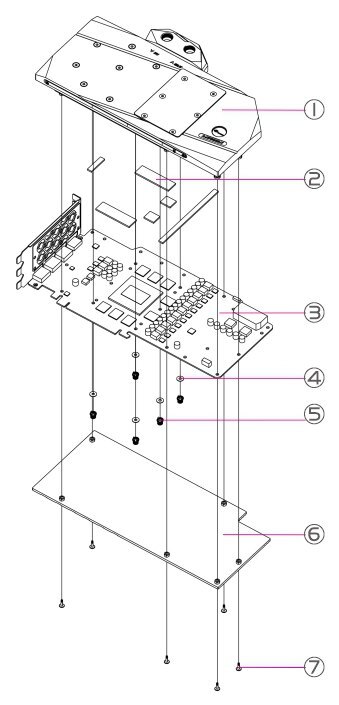
Bykski assembly drawing. 1 block · 2 thermal pads · 3 graphics card PCB · 4 washers · 5 spring screws · 6 backplate · 7 backplate screws.
FAQ
Which XFX RX 6800 XT version does this water block fit?
Bykski lists the RX 6800 XT Overseas Edition V2. Match the entire PCB to the drawing before ordering.
What fittings do I need for this block?
Use G1/4 fittings that match your tubing. Use the supplied stop plugs to seal the unused ports.
Which header powers the lighting?
Use a 5V 3-pin ARGB header and align the connector arrow with +5V. A 12V 4-pin RGB header can damage the strip.
Does the block include a backplate?
Yes. The supplied black aluminum backplate mounts behind the graphics card PCB.
- This is a repair or replacement-only item. Returns are not accepted on compatibility issues or if the block has had water/fluid run through it.
- The manufacturer reserves the right to alter the block design to expand compatibility. The delivered item may not 100% match the pictured item. The product does NOT come with English instructions. Please see the product gallery images for the install guide if available. Generally, thermal pads should be installed on the card where the block has corresponding raised contact points, except the GPU core, which uses thermal paste. Installing pads on other components can lead to improper contact and poor performance.
- Not responsible for any damage caused by or when using this product. Please use it at your own risk.








