


Bykski


Lian Li O11 Dynamic Water Cooling Kit, Bykski RGV-LAN-O11-D360
Hard-tube water cooling kit for the Lian Li O11 Dynamic
The Bykski RGV-LAN-O11-D360 is a custom water cooling kit for the Lian Li PC-O11 Dynamic. Its acrylic distro plate gives the CPU block, one GPU block, and the radiators a central place to connect. The plate is designed for 360 mm radiators at the top and bottom of the case.
Compatibility
- ✓Lian Li PC-O11 Dynamic (original model)
Select the Intel or AMD kit for your CPU. Contact FormulaMod before ordering to check your CPU socket and graphics card PCB compatibility.
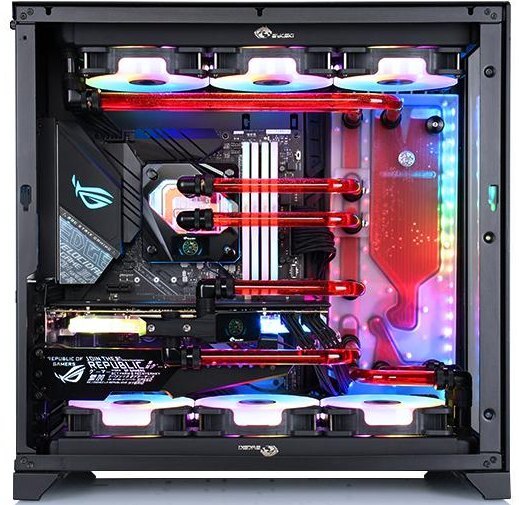
Example build in the original O11 Dynamic.
Design Highlights
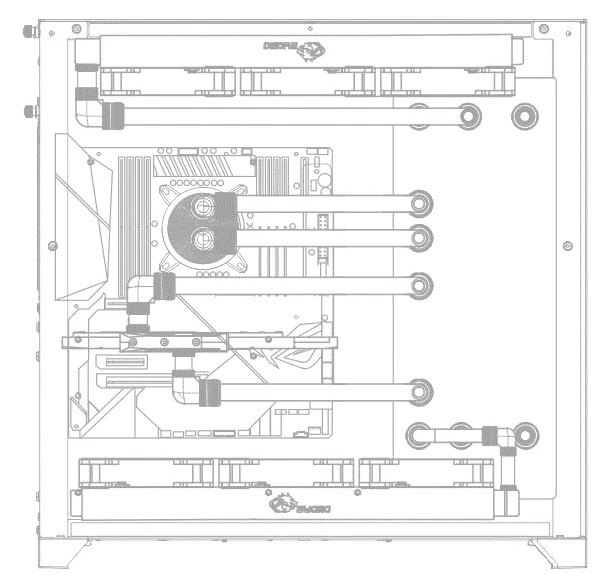
Bykski’s reference layout for a top and bottom radiator.
One place to route the loop
The plate mounts beside the motherboard tray. Its channels and reservoir bring the tube runs for the two blocks and both radiator positions to the same side of the case.
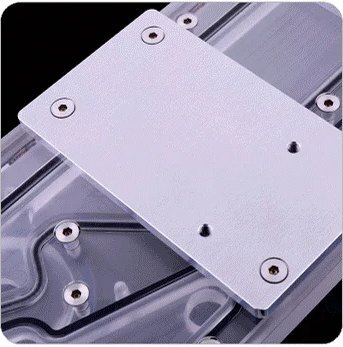
Metal threads for case mounting
The case-mount screws thread into the aluminum backplate. The acrylic body contains the coolant channels and has a mount for a DDC pump.
Key Specifications
| Model | RGV-LAN-O11-D360 |
|---|---|
| CPU kit options | Intel or AMD |
| Distro plate | Transparent PMMA acrylic with aluminum mounting backplate |
| Distro plate length × width | 342.5 × 132.5 mm |
| Distro plate port thread | G1/4 |
| Pump mount | DDC |
| Radiator layout | 360 mm at the top and 360 mm at the bottom |
| Distro plate lighting | Bykski RBW · 5 V 3-pin ARGB |
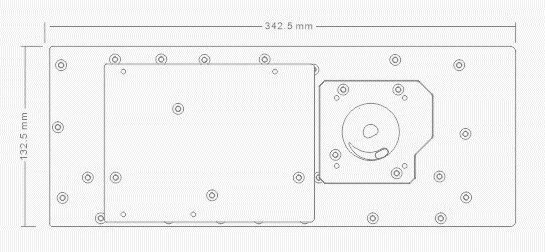
Plate length and width in millimeters.
Which Version Do I Need?
What's in the BoxBefore ordering, ask FormulaMod to confirm radiator, fan, and fitting quantities for your selected kit.
After ordering, contact FormulaMod to confirm your exact graphics card model so we can match the GPU block to your card.
Supply your own coolant.
Provide G1/4 stop plugs for unused GPU-block ports.
Thermal paste is not included (it cannot be shipped by air). Please use your own thermal paste during installation.
Installation & Use
Have the PC-O11 Dynamic case and coolant for PC water cooling on hand.
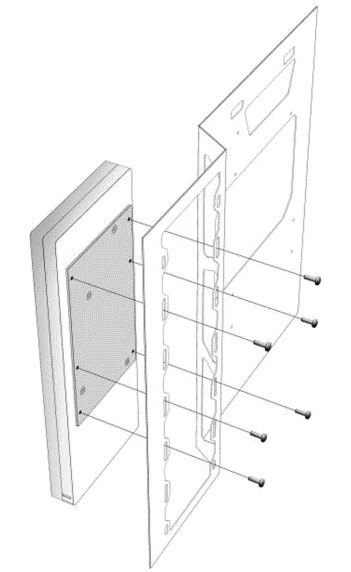
The case-mount screws thread into the aluminum plate.
FAQ
Which Lian Li O11 case fits this kit?
The plate is designed for the original Lian Li PC-O11 Dynamic. Check the full model name of your case before ordering.
Which CPU and GPU blocks should I select?
Choose the Intel or AMD option for your CPU and confirm the exact socket with FormulaMod. After ordering, send FormulaMod your full graphics card model and PCB revision so the GPU block can be matched to your card.
Where do the 360 mm radiators go?
The reference loop places a 360 mm radiator at the top and another at the bottom. Check your kit’s packing list for radiator and fan quantities before buying parts for the second position.
Which lighting connector does the plate use?
The plate uses Bykski RBW 5 V 3-pin ARGB. Use the included adapter cable to connect it to a compatible motherboard header.
Do I need to buy coolant separately?
Yes. Have coolant for a PC water cooling loop ready before installation.
- 2. The program kit, which only include the products in the corresponding program kit list. The products such as case, RAM blocks, motherboard etc. outside the list, only for reference and display. The kit's actual installation results will vary depending on progarm and case, builder ideas, etc.
- As Bykski upgrades or adjusts the contents of the kit from time to time, such as product updates version, model or appearance, adjustments to the kit list, etc., If not notified in time, the Bykski's latest real object and the newest list shall prevail








