


Barrow


16-Port Fan and ARGB Controller with Remote | Barrow DK301-16
stars, based on ( 0 ) review
FormulaMod Official Store
Barrow · DK301-16
16-Port Fan and ARGB Controller
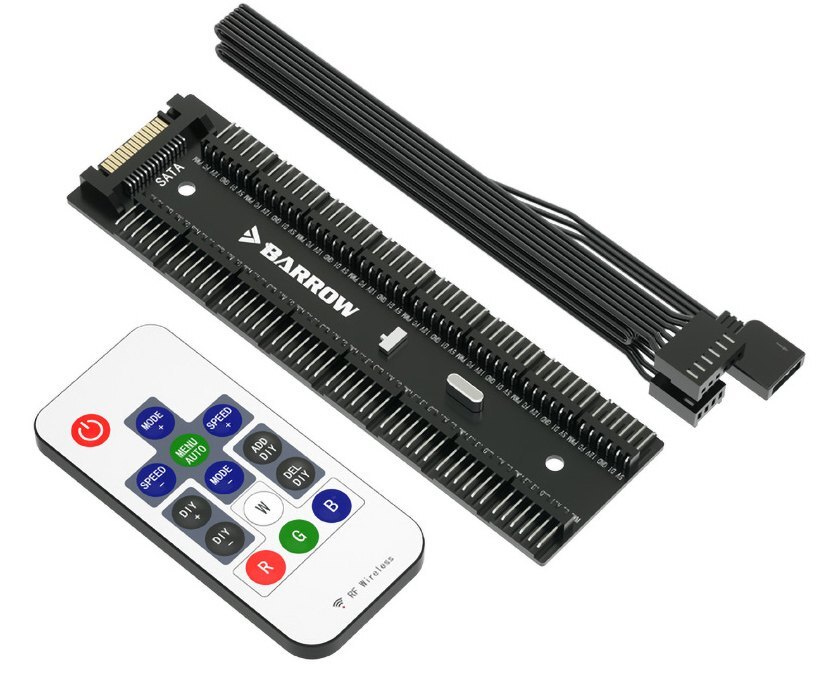
The Barrow DK301-16 is a SATA-powered hub that brings compatible PWM fans and 5V addressable lighting together on one board. It has 16 keyed 6-pin device ports. Use the included RF remote to change lighting effects or connect the motherboard adapter cable to sync lighting with your PC.
Device ports
16 × keyed 6-pin
Fits
Barrow LRC 2.0 lighting
Power
SATA
Compatibility
Check both the device plug and the motherboard header before ordering.
- ✓Device side: Barrow LRC 2.0 lighting plugs and compatible 4-pin PWM fan plugs. Align each plug with the matching pins on the hub.
- ✓Motherboard side: 5V 3-pin ARGB for lighting sync and a 4-pin PWM fan header for fan speed control.
Not compatible:
- ✗Barrow LRC 1.0 lighting
- ✗12V 4-pin RGB lighting headers
Key Specifications
| Model | DK301-16 |
|---|---|
| Color | Black |
| Power input | SATA |
| Device outputs | 16 keyed 6-pin ports |
| Lighting control | RF remote or 5V 3-pin motherboard ARGB sync |
| Fan control | Motherboard PWM via the adapter cable |
| Motherboard adapter cable | 500 mm |
| Mounting | Screws or adhesive backing |
What's in the Box
1 × DK301-16 controller1 × RF remote1 × motherboard adapter cable
Installation & Use
1
Mount the controller in your case using its adhesive backing or screws.
2
With the PC powered off, connect SATA power from the power supply and plug in the compatible fans and lighting.
3
Plug the motherboard adapter cable into one of the controller’s 6-pin ports. This leaves 15 ports for devices while the cable is connected. For PWM fan control, connect the adapter’s fan plug to a motherboard PWM fan header.
4
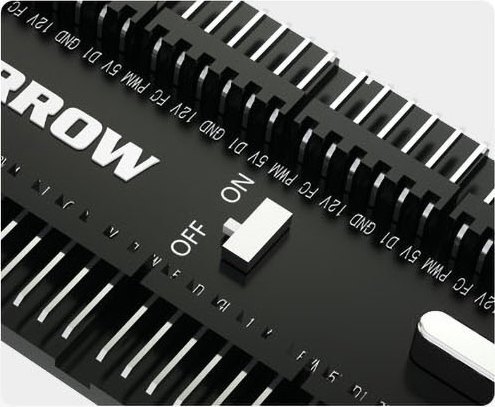
Set the switch to ON for RF remote lighting control. For motherboard lighting sync, connect the adapter’s lighting plug to a 5V 3-pin ARGB header and set the switch to OFF.
FAQ
Can I control the lights without a motherboard ARGB header?
Yes. Connect SATA power and set the switch to ON to control the lighting with the included RF remote.
Does the remote change fan speed?
Fan speed follows the motherboard PWM signal when the adapter’s fan lead is connected to a PWM fan header. The remote changes lighting effects.
Can I use a 12V RGB header for motherboard sync?
Use a 5V 3-pin ARGB header for lighting sync.
Notes
- In case of product appearance structure upgrade, without further notice, in kind prevail.








