


Bykski


120mm RGB Case Fan Set with Controller - Aigo Aurora C3 3-Pack
120 mm RGB fan set with button controls
The Aigo Aurora C3, also called OctaveSpace C3, is a set of three 120 mm RGB fans for desktop PC airflow. Mount them in 120 mm case fan positions or on a radiator with matching fan mounts. The included controller adjusts fan speed and ring lighting from its own buttons.
Mounting & Connections
Check the fan mounts, clearance, and power connector before ordering.
- ✓Desktop PC cases with 120 mm fan mounts and clearance for a 25 mm-thick fan.
- ✓120, 240, and 360 mm radiators with 120 mm fan mounts.
Plug the fan leads into the supplied C3 controller. Power the controller from a 4-pin Molex peripheral connector on your PC power supply.
Design Highlights

RGB rings with separate speed controls
Each fan has an RGB light ring. Use the controller buttons to adjust fan speed, choose a lighting pattern, and change how fast the effect moves.
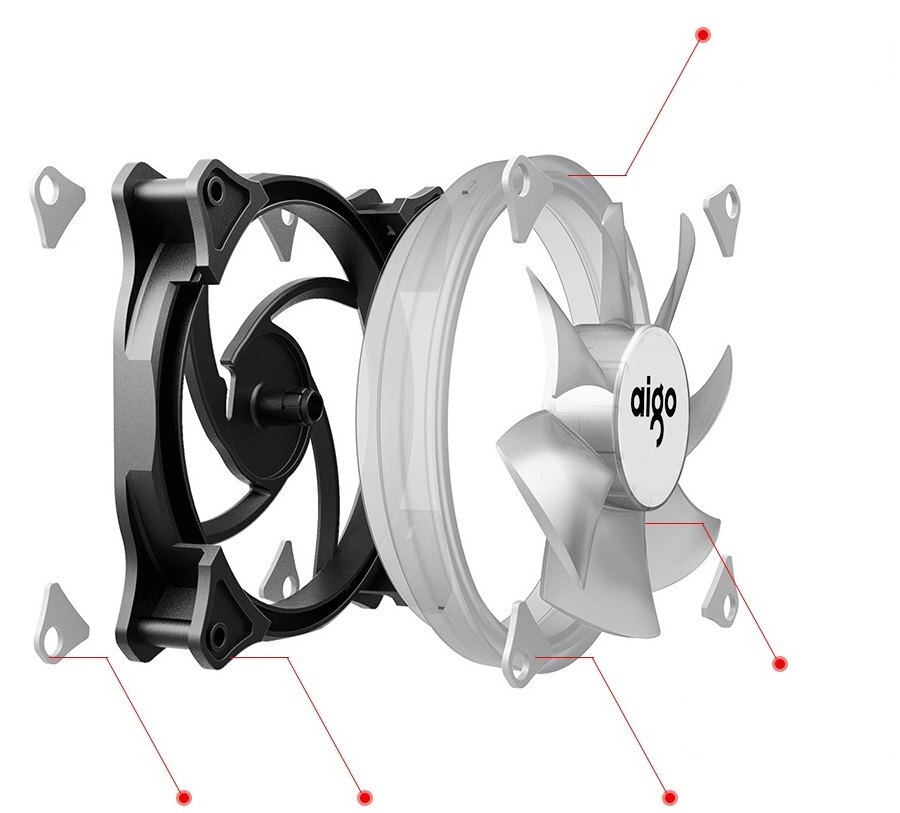
Silicone pads on both sides
Silicone pads at the front and rear mounting corners cushion the plastic frame where it meets the mount. The fan has seven transparent blades inside the clear light ring.
Key Specifications
| Model / store SKU | Aurora C3 / Aigo-C3 |
|---|---|
| Fan dimensions | 120 × 120 × 25 mm each |
| Lighting | Controller-driven RGB ring |
| Fan connector | 6-pin to included controller |
| Controller input | 4-pin peripheral (Molex) from PSU |
| Controller capacity | Up to 10 C3 fans |
| Per-fan electrical specs | 12 V DC, 0.35 A, 4.2 W rated |
| Published noise level | 23.5 dBA per fan |
| Bearing and rated life | Hydraulic bearing, 20,000 hours |
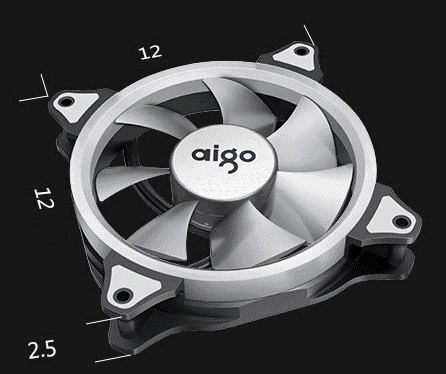
Dimensions shown in centimeters.
Which Version Do I Need?
Both Aigo kits use 120 mm fans. Choose by how you want to control the lighting.
What's in the Box
Installation & Use
You need a PC power supply with a 4-pin Molex peripheral connector. For radiator mounting, have the screws specified by your radiator manufacturer.

Air enters at the blue arrows and exits at the pink arrows.
FAQ
What does the 4-pin connector power?
The 4-pin Molex connector supplies power to the C3 controller. Each fan plugs into that controller through its own 6-pin lead.
How many fans can one C3 controller run?
It can run up to 10 C3 fans. Connect the fans in numerical order starting at FAN 1.
Can I change fan speed and RGB separately?
Yes. The controller has separate buttons for fan speed, lighting mode, and lighting effect speed.
Will these fans fit a 240 mm radiator?
Yes, if the radiator has 120 mm fan mounts. Each fan is 25 mm thick. Use the screws specified for your radiator.
- You can connect your case’s reset switch to the controller’s switch input to change lighting modes from the case button.





