Bykski


GIGABYTE RTX 4090 AIO GPU Cooler, 360 mm – Bykski B-FRD-GV4090AORUS
360 mm AIO liquid cooling for select GIGABYTE RTX 4090 cards
The Bykski B-FRD-GV4090AORUS replaces the stock cooler on supported GIGABYTE GeForce RTX 4090 and 4090 D cards. Choose the -360 kit for one graphics card or the -360-H kit for two. Both kits ship with the tubing connected and the loop prefilled, and each uses one 360 mm radiator. Check your exact card model and PCB layout before ordering.
Compatibility
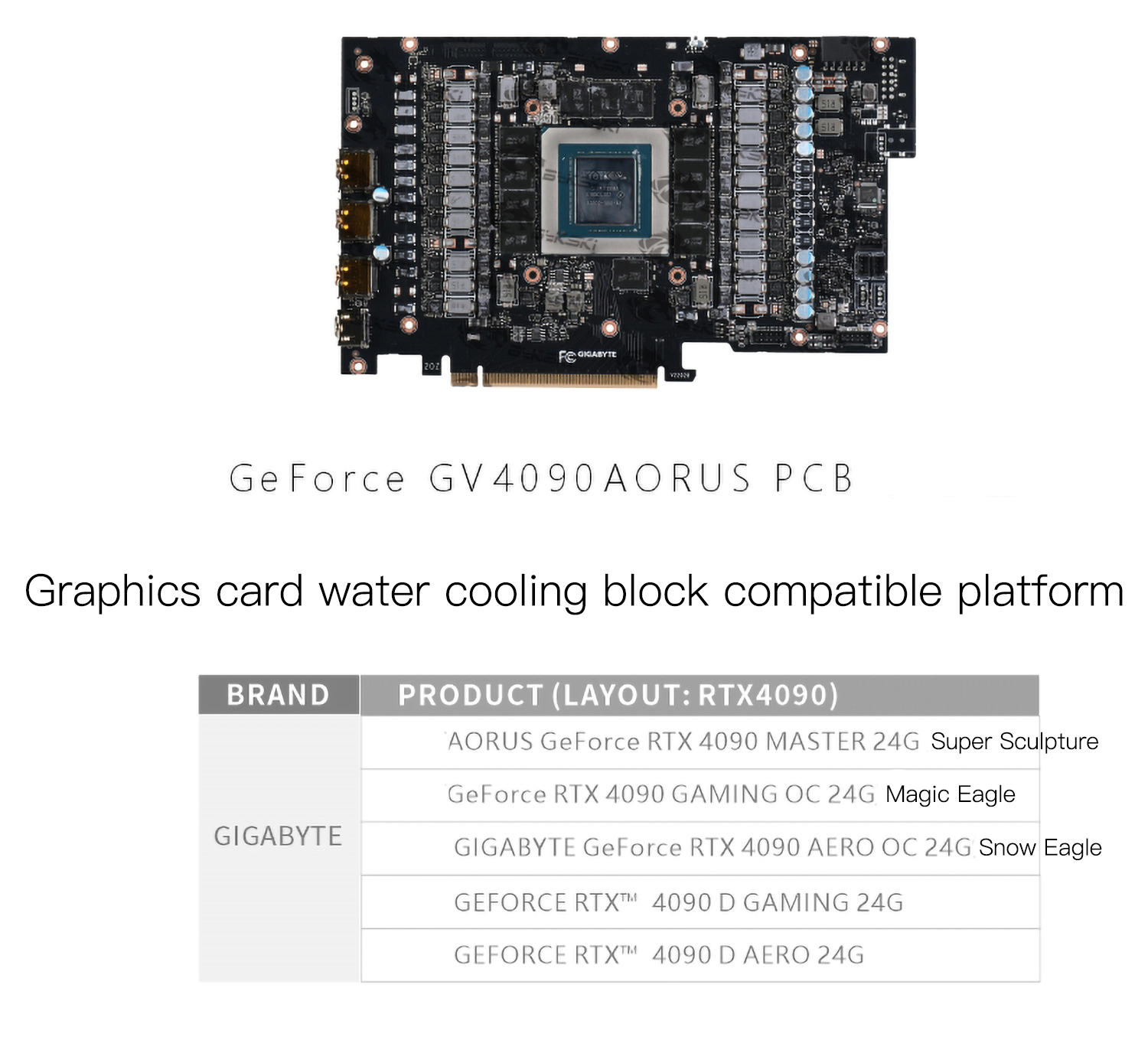
Bykski lists these GIGABYTE cards for the PCB layout shown.
- ✓GIGABYTE AORUS GeForce RTX 4090 MASTER 24G
- ✓GIGABYTE GeForce RTX 4090 GAMING OC 24G
- ✓GIGABYTE GeForce RTX 4090 AERO OC 24G
- ✓GIGABYTE GeForce RTX 4090 D GAMING 24G
- ✓GIGABYTE GeForce RTX 4090 D AERO 24G
Before ordering, confirm the full model name and compare your card’s PCB with the board shown here. For the standard 360 mm kit, check that your case has room for the radiator, fans, and tubing.
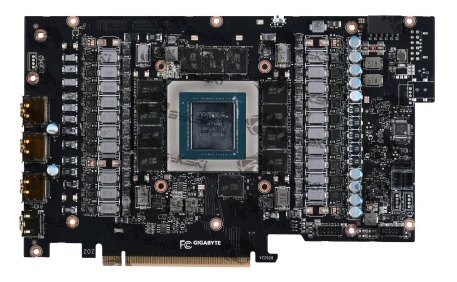
Bare GIGABYTE GV4090AORUS PCB shown by Bykski.
Design Highlights for the Standard 360 mm Kit
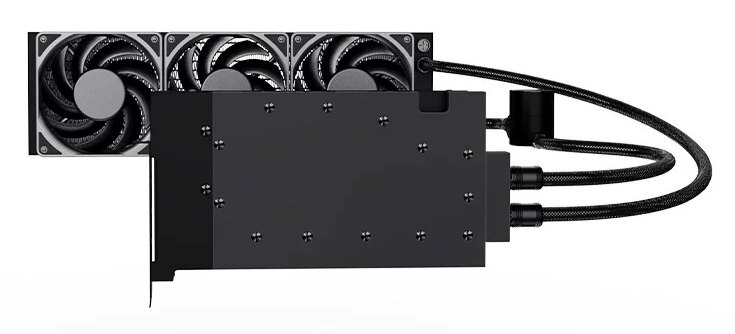
Bykski illustration of the standard 360 mm kit (B-FRD-GV4090AORUS-360).
A preassembled cooling loop
Braided hoses link the GPU block and radiator, with the pump fitted into the hose run. The prefilled assembly saves you from building and filling a separate cooling loop.
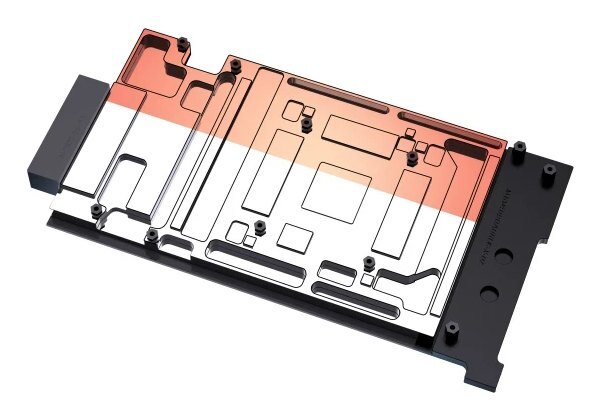
Full-cover copper cold plate
The T2 copper plate has contact areas for the GPU die, memory, and power delivery components. The backplate mounts on the opposite side of the board.
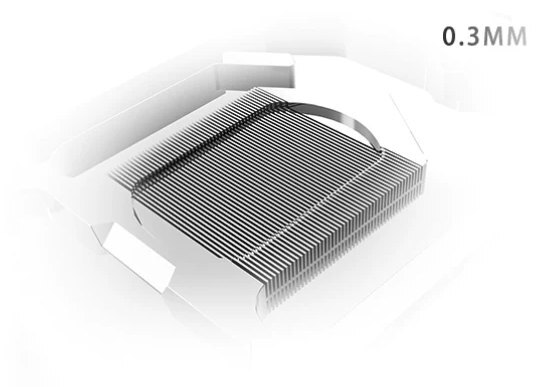
Parallel microchannels
Coolant flows through 0.3 mm parallel microchannels in the cold plate, exposing more copper surface to the liquid.
Key Specifications
| Model | B-FRD-GV4090AORUS |
|---|---|
| Single-GPU kit | B-FRD-GV4090AORUS-360 |
| Dual-GPU kit | B-FRD-GV4090AORUS-360-H |
| Color | Black |
| Radiator and fans (both kits) | 1 × 360 mm radiator (38 mm thick) and 3 × 120 mm fans (25 mm thick) |
| Radiator and fan clearance (both kits) | 63 mm, plus clearance for tubing |
| Standard kit cooling loop | Prefilled GPU AIO with inline pump and braided tubing |
| Standard kit cold plate | T2 copper |
| Standard kit microchannels | 0.3 mm, up to 44 channels |
| Standard kit GPU block (L × W × T) | 261.80 × 137.21 × 16 mm |
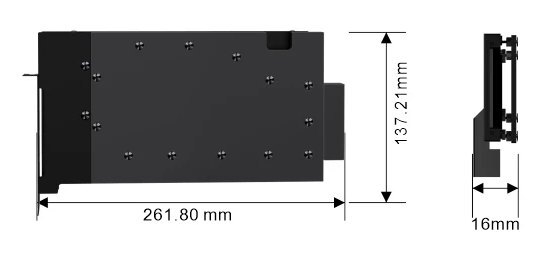
Bykski’s standard-kit GPU block assembly drawing. Measurements are in millimeters.
Which Version Do I Need?
What’s in the Box?
Both kits ship with the tubing connected and the loop prefilled. The single-GPU kit uses an inline pump and braided tubing.
Thermal paste is not included (it cannot be shipped by air). Please use your own thermal paste during installation.
Installation & Use for the Standard 360 mm Kit
Have a compatible graphics card and a case with room for the radiator and fans. Use the supplied thermal pads on the indicated components and your own GPU thermal paste on the die.
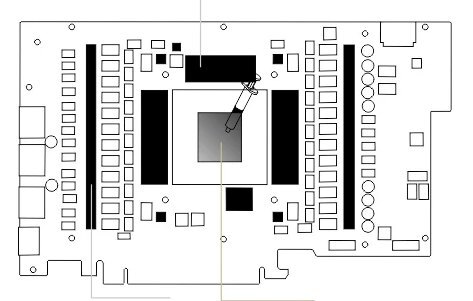
Bykski’s diagram marks the memory and power delivery components for thermal pads. Apply thermal paste to the GPU die in the center.
FAQ
Will this fit my GIGABYTE RTX 4090 AERO?
Bykski lists the RTX 4090 AERO OC 24G and the RTX 4090 D AERO 24G. Confirm your exact model and match its PCB to the image above.
Do I need to build a custom loop for the standard 360 mm kit?
The standard kit comes with the radiator, pump, and GPU block connected in a prefilled loop. Mount the block and radiator, then connect power to the pump and fans.
What radiator mount and clearance do the kits need?
Use a 360 mm radiator mount. Both kits use a 38 mm radiator and 25 mm fans, so allow 63 mm for the radiator and fans. Leave additional room to route the tubing.
Which parts of the card does the standard kit’s block cool?
The full-cover block contacts the GPU die, memory, and power delivery components at the locations shown in the installation diagram.
- Keep the original graphics card cooler and its mounting hardware for future reinstallation.