


Bykski


Cambricon MLU370-X8 Full-Cover Water Block with Backplate | Bykski C-ML370X8-X
Full-cover water block for the Cambricon MLU370-X8
The Bykski C-ML370X8-X is a full-cover water block with a backplate for the Cambricon MLU370-X8 48 GB PCIe accelerator. It replaces the card’s passive heatsink with a nickel-plated copper cold plate that contacts the accelerator chips, memory, and power circuitry. A custom liquid cooling loop carries that heat to a radiator.
Compatibility
Bykski lists this board layout.
- ✓Cambricon MLU370-X8 48 GB (PCIe 4.0 ×16, ML370X8 PCB layout)
Before ordering, match your exact card model, PCB layout, and mounting holes to the board in the photo.
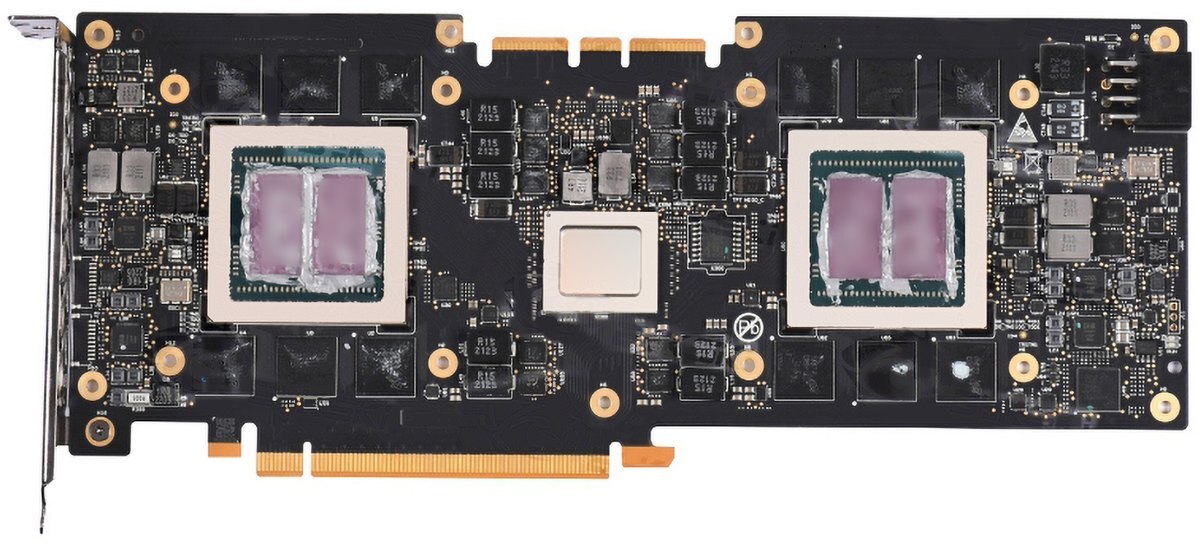
Cambricon MLU370-X8 bare PCB shown by Bykski.
Design Highlights
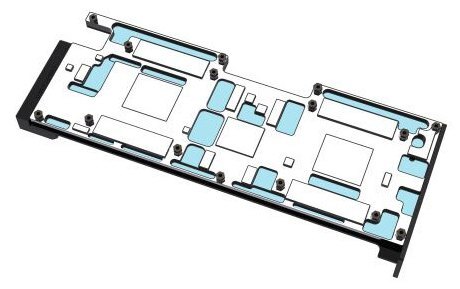
Full-cover T2 copper cold plate
The 264 mm cold plate spans the accelerator chips, memory, and power circuitry. Bykski lists a thermal conductivity of 401 W/(m·K) for the copper itself.
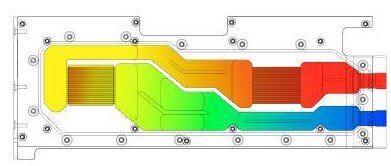
Manufacturer’s coolant path illustration.
Coolant path across both accelerator chips
Coolant flows through two microchannel areas in the cold plate. The black POM terminal provides the G1/4 inlet and outlet for your loop.
Key Specifications
| Model (SKU) | C-ML370X8-X |
|---|---|
| Cold plate | Nickel-plated T2 copper |
| Cover and terminal | Stainless steel cover and black POM terminal |
| Backplate | Black anodized aluminum |
| Port thread | G1/4 |
| Water block (L × W × T) | 277.86 × 106.49 × 32.08 mm |
| Backplate (L × W × T) | 266.78 × 106.65 × 6.00 mm |
| Lighting | None |
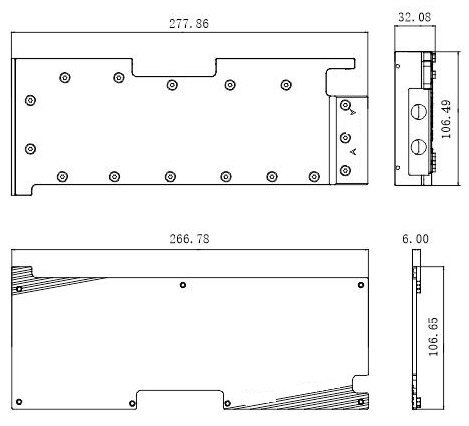
Manufacturer drawing in millimeters. Water block above, backplate below.
Which Version Do I Need?
Look for the full MLU370-X8 model name. Cambricon lists the MLU370-X4 as a 24 GB single-slot card and the MLU370-S8 as a 48 GB half-height, half-length card.
What's in the Box
Thermal paste is not included (it cannot be shipped by air). Please use your own GPU thermal paste during installation.
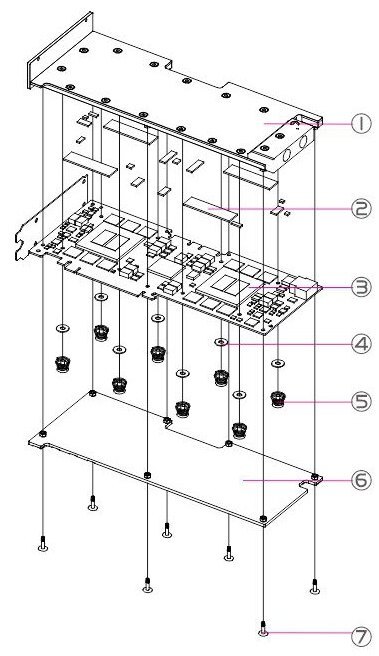
1 Water block · 2 Thermal pads · 3 Your PCB · 4 Insulating washers · 5 Spring screws · 6 Backplate · 7 Backplate screws
Installation & Use
You’ll also need a pump, reservoir, radiator, G1/4 tubing fittings, tubing, and coolant.
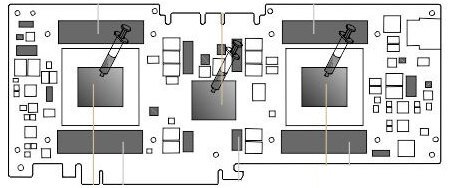
Shaded memory and power components take pads. Applicator icons mark the surfaces for GPU thermal paste.
FAQ
How is the Cambricon MLU370-X8 cooled from the factory?
Cambricon lists a maximum thermal power of 250 W for the MLU370-X8. Its stock heatsink is passive and relies on airflow from the chassis.
What are the Cambricon MLU370-X8 card specs?
The stock accelerator has 48 GB of LPDDR5, a PCIe 4.0 ×16 interface, and a full-height, full-length, dual-slot form factor. Cambricon lists a peak of 256 TOPS at INT8.
Do I need a separate pump and radiator?
Yes. Connect the block to a custom cooling loop with a pump, reservoir, and radiator.
What should I check for chassis clearance?
Use the block and backplate dimensions above. Leave additional space at the terminal for G1/4 fittings and tubing.
Which thermal pads should I use?
Use the 1.5 mm pads at the memory and power-component contact points shown in the diagram.
- This is a repair or replacement-only item. Returns are not accepted in principle on compatibility issues or if the block has had water/fluid run through it.
- The manufacturer reserves the right to alter the block design to expand compatibility or upgrade/modify the product. The delivered item may not 100% match the pictured item.
- Not responsible for any damage caused by or when using this product. Please use it at your own risk.
- The copper plate of the block is processed by CNC machines. The machining marks and slightly uneven on the copper plate are normal and do not affect the use of the block. Please pay attention to this.








