


Bykski


NVIDIA L4 AIO Liquid Cooler (Tesla L4), 360 mm | Bykski B-FRD-TESLA-L4-360
360 mm all-in-one liquid cooler for NVIDIA L4
The Bykski B-FRD-TESLA-L4-360 is a 360 mm all-in-one liquid cooler for the NVIDIA L4 Tensor Core GPU with 24 GB of GDDR6 and a low-profile PCIe board. It replaces the stock passive heatsink with a full-cover water block. An inline pump circulates coolant through a fan-cooled radiator, giving tower workstations another way to cool an L4 that otherwise relies on chassis airflow.
Compatibility
Compatible GPU
- ✓NVIDIA L4 Tensor Core GPU, 24 GB GDDR6, low-profile PCIe card matching the PCB layout shown by Bykski
Before ordering, compare the mounting holes and component positions on your PCB with the board diagrams in the installation section.
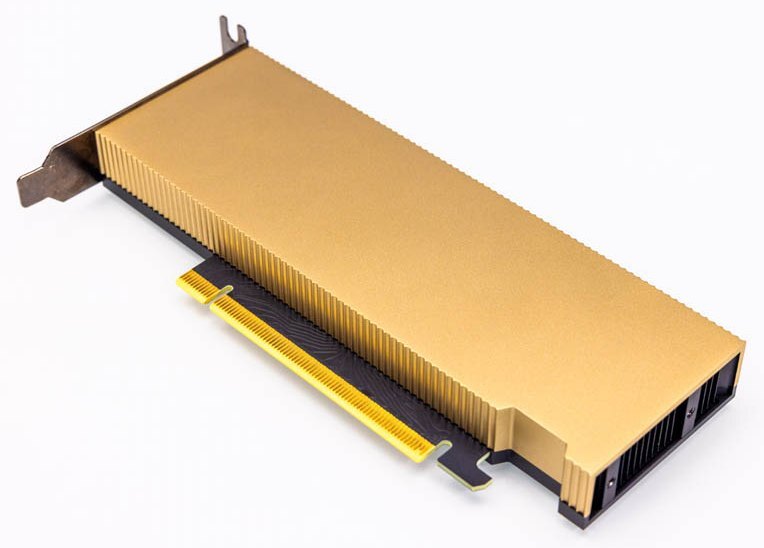
NVIDIA L4 GPU with its original passive heatsink.
Design Highlights
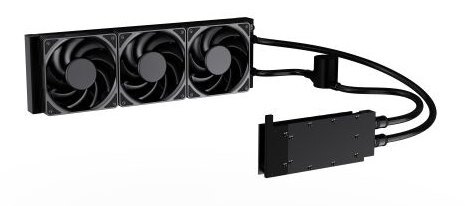
An assembled cooling loop
Braided tubing connects the GPU block, inline pump, and radiator in one assembly.
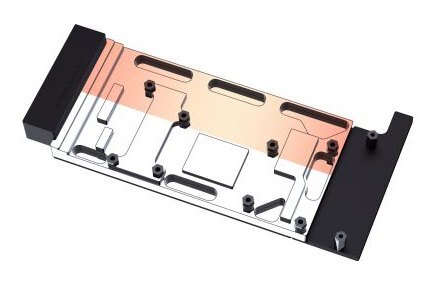
One cold plate covers the core, memory, and power stages
The full-cover metal block has an electroless nickel-plated T2 copper base. Coolant runs through 0.3 mm jet microchannels in the cold plate.
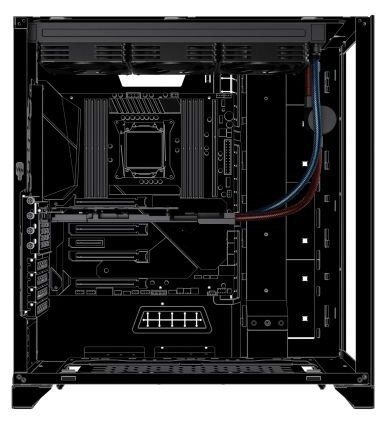
Plan where the radiator and tubing will go
Bykski shows a top-mounted radiator with the tubing running to the card. Allow room for the radiator and fans at the mount and for the tubing between the radiator and card.
Key Specifications
| Model | B-FRD-TESLA-L4-360 |
|---|---|
| Compatible GPU | NVIDIA L4 Tensor Core GPU, 24 GB GDDR6, PCIe Gen4 x16 |
| Stock GPU form factor | Low-profile, half-length, single-slot |
| Stock GPU max TDP | 72 W |
| Cold plate | Electroless nickel-plated T2 copper |
| Copper thermal conductivity | 401 W/(m·K), as listed by Bykski |
| Block dimensions | 185.40 × 87.84 × 16.00 mm (manufacturer drawing) |
| Radiator | 360 mm mount, 396 mm long as drawn by Bykski, 12 coolant channels |
| Tubing | Braided, with inline pump |
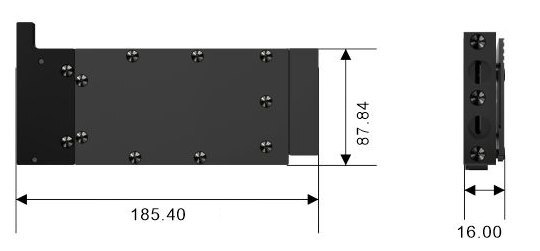
Water block dimensions in millimeters (manufacturer drawing).
Which Version Do I Need?
For the NVIDIA L4, choose the cooler that fits your setup.
What's in the Box
Contents shown for the B-FRD-TESLA-L4-360.
Thermal paste is not included (it cannot be shipped by air). Please use your own GPU thermal paste during installation.
Installation & Use
You also need a chassis with a 360 mm radiator mount, room for the radiator and fans, and compatible power connections for the pump and fans.
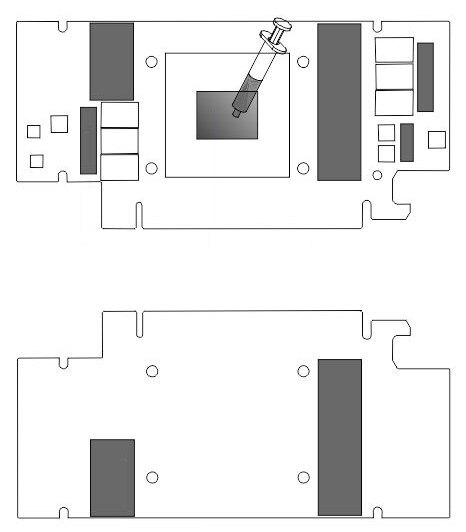
The upper diagram shows the memory and MOSFET pads and paste on the GPU die. The lower diagram shows pad locations on the back of the board.
FAQ
Do I need a separate pump?
The standard 360 mm kit includes an inline pump in the tubing between the block and radiator.
Will this cooler fit my case?
Check that your case has a 360 mm radiator mount. Confirm space for the radiator and fans together, and a clear tubing path to the L4.
Why does the NVIDIA L4 need airflow with its stock heatsink?
The stock NVIDIA L4 is passively cooled and relies on air moving through the system. With the AIO installed, the radiator fans remove heat carried from the card by the coolant.
What form factor is the NVIDIA L4 GPU?
The stock NVIDIA L4 is a half-height, half-length, single-slot PCIe card.
- Confirm the exact PCB layout and case clearance before ordering. If you choose another configuration from the size menu, confirm its contents and required clearance.








